
Team leads are appointed by TheBossT, based on a combination of experience, reliability, how long they've worked on the project, and work ethic. Team leads are not allowed to change their Discord username, unless the old name is still the leading & main part of it (ex. TheBossT -> TheBossT | P3 Fan). They also receive a team lead role on Discord, which essentially has admin privileges.
Responsibilities
Section titled “Responsibilities”The main tasks of team leads are:
- Manage & organize the tasks people work on, ensuring people are busy!
- Directly assign tasks to members if they need to be done ASAP
- Ensure people are committing & progressing through tasks
- Ensure tasks are progressing in a timely manner (i.e. people aren't stuck on them, & are actually working through them)
- Helping people out if needed (which includes making decisions & giving your opinions if needed)
- If there are any issues/questions that your team cannot answer, you talk to the appropriate team's leader, and if they cannot answer, you talk to TheBossT
- Communicating with TheBossT on a regular basis about the tasks/progress (how your team is doing) so they stay updated. TheBossT shouldn't need to come to team members directly, but should be able to hear everything from you
- Writing a weekly check-in each Saturday
- Making sure that the team hits the deadlines & milestones
- Organize & lead team meetings if necessary
- Create, manage, and update guidelines & documentation for the team and its workflow
- Reviewing applicant applications for your team (& approving/rejecting applicants in a timely manner)
- Moderating your team's channels and the general Discord server
Privilages
Section titled “Privilages”- Assigned the @Team Lead role (essentially Admin privilage)
- Access to a special #team-lead-chat where all team leads can talk to each other
- Access to a special private team lead Google Drive
- If you are a Developer, you may (on request) gain access to certain Developer permissions (ex. Cloudflare Admin, GitHub Org Admin, etc.)
Moderation
Section titled “Moderation”- Ensure that the Discord Server Rules & Guidelines (also outlined in #rules) are maintained
- Team leads (without needing to consult other team leads) can KICK people
- Team leads need to consult other team leads when they want to BAN people
Current Team Leads
Section titled “Current Team Leads”| Team | Lead |
|---|---|
| Project | @thebosst |
| Game Dev | @themoonwalker8692 |
| Web Dev | @cellsera_c |
| Graphics | @godot5111 |
| UX/UI | @thebosst |
| 3D | @pixelkat05 |
| Music | @flamaniax |
| Video | @migbuild1911 |
Weekly check-ins
Section titled “Weekly check-ins”To keep an overview of the current status of active tasks, team leads will write a weekly check-in every weekend, usually on Saturday. Here's an example for a check-in:
Hey team, here's the weekly check-in
@MalicousEasterBunny123 - Was doing some research. Iwatodai Streets environment model. Still WIP. How's progress/any plans on what you will do?
@HappyHamster - Was doing some research. Makoto character model & Iwatodai Dorm (lounge) environment model. Still WIP. How's progress/any plans on what you will do?
...
All 3D issues are here
If you're working on something but I've missed it, leave a message below.
This is to ensure no one gets stuck on a task, that the GitHub project board stays up to date, checking the current availability of individual team members and clarifying uncertainties on current tasks.
Applicant Management
Section titled “Applicant Management”People who add themselves to the Applicant role will immediately get pinged in a private thread under the #apply-to-the-team channel. Team leads will also be pinged! The private thread simply contains application instructions and is where applicants will be notified of their application status, and can privately talk to team leads. Applicants will apply to the team using the Google Form (contained in the instructions) & team leads can view applications via the linked Google Sheet.
Instead of pinging/DM'ing applicants regarding their application status, use Elizabeth bot within the applicant's private thread/approve [user] [role1] [optional: role2]
/reject [user] [optional: role1] [optional: role2]
For /reject in particular, if you don't specify any roles, then it auto-defaults to rejecting from ALL roles!
Note that:
- Team leads don't give a reason, they just say approve/rejected
- Team leads don't give feedback on application results (even if people ask)
Once team leads have approved/rejected an applicant & the applicant has seen the message (or they don't respond within 48hrs), then in the private thread, "end" the application process via /close_ticket [user] & delete the applicant's application info in the Google Sheet.
Documentation
Section titled “Documentation”Team leads are responsible for relevant documentation pertaining to your team on both the Google Drive (Google Doc files) & on docs.p3dual.com.
Google Docs
Section titled “Google Docs”Editing the Google Docs is self-explanatory. Simply find the doc file in the Google Drive, and start editing!
docs.p3dual.com
Section titled “docs.p3dual.com”To edit docs on docs.p3dual.com,
- Go to docs.p3dual.com/keystatic & sign in with your GitHub account
- Create a new branch with the docs/ prefix

You can now select documentation files & edit them! Ensure that once changes have been made to a page, the "Save" button in the top right corner is clicked!
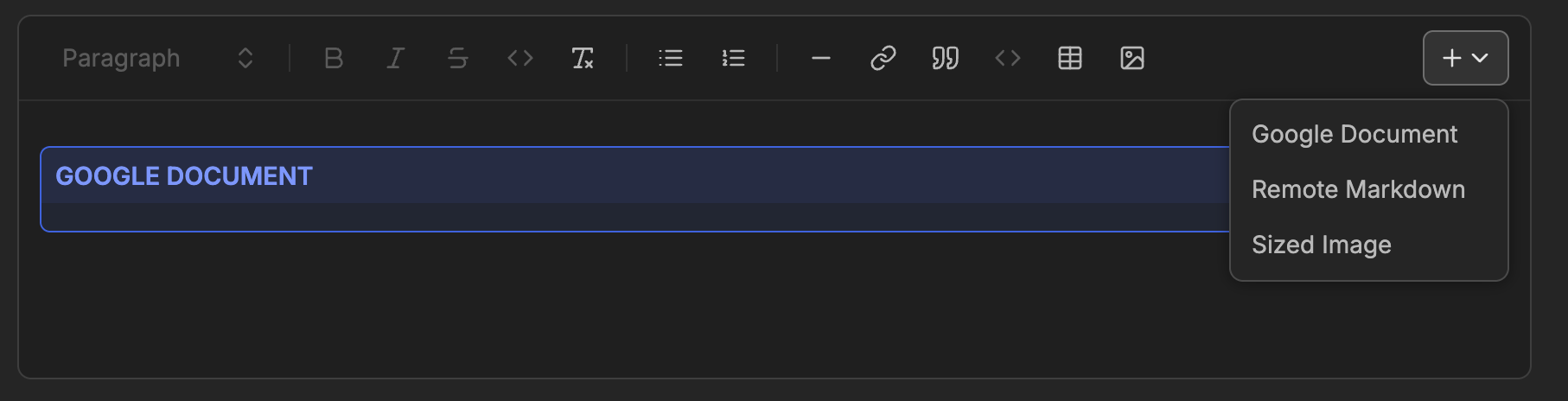
The docs website uses markdown (.md) formatting. The docs website also has custom components that you can access by clicking the + icon in the text editor.
To create a new page on the docs website, simply click "Add" in the top right corner of the page.